
Increase average order
value on every
Squarespace sale
UpsellGrow adds cross-sells, bundles, and frequently bought together offers to your Squarespace store — across 5 locations, 19 positions. No coding. Works in minutes.
Try it yourself
Five touchpoints across every order. Your offer reaches customers while they're browsing, buying, and coming back — turning every visit into a chance to earn more without chasing new traffic.

On your product page
Your customer sees an offer while they're already interested.
In the slide-out cart
The drawer opens. An offer appears at the exact moment they've committed to buying.
On the cart page
They're reviewing their order. Show more relevant offers before they pay.
On the order confirmation
They just bought. Buying mood is at its peak. More sales from customers who are already yours.
On the order status page
They're back — checking their delivery. More chances to sell without needing a single new visitor.
You're already getting customers.
You're just not earning enough from each one.
Most Squarespace stores focus entirely on traffic. But the stores with the highest revenue earn more from every single order — by showing customers what else they'll want, right when they're ready to buy.
of potential revenue is lost because customers don't know what else to buy from your store.
of customers who buy once will buy again if shown a relevant product at the right moment.
cheaper to earn more from an existing customer than to acquire a new one through ads.
Three offer types.
Each built to sell more.
Every offer is one of three types. You choose the type, the page, the position, and which products to pair. Full control — no black-box AI.
Cross-sell
Show a related product alongside what the customer is viewing. Your suggestion goes on top of the original item. The goal is to add one more product to the order.
Example: Customer views a linen shirt → you suggest matching trousers or a leather belt.
Bundle offer
Group two or more products and sell them as a package — usually at a discount. The fastest-converting offer type for increasing average order value.
Example: Shirt + Trousers + Belt at 15% off. Customer saves money, you earn more per order.
Frequently bought together
UpsellGrow analyses your real order history and surfaces the products customers actually buy together. Data-driven — not a guess. Updates automatically as new orders come in.
Example: 68% of customers who bought Candle A also bought the Ceramic Holder. UpsellGrow pairs them automatically.
A better cart — with
upsells built in
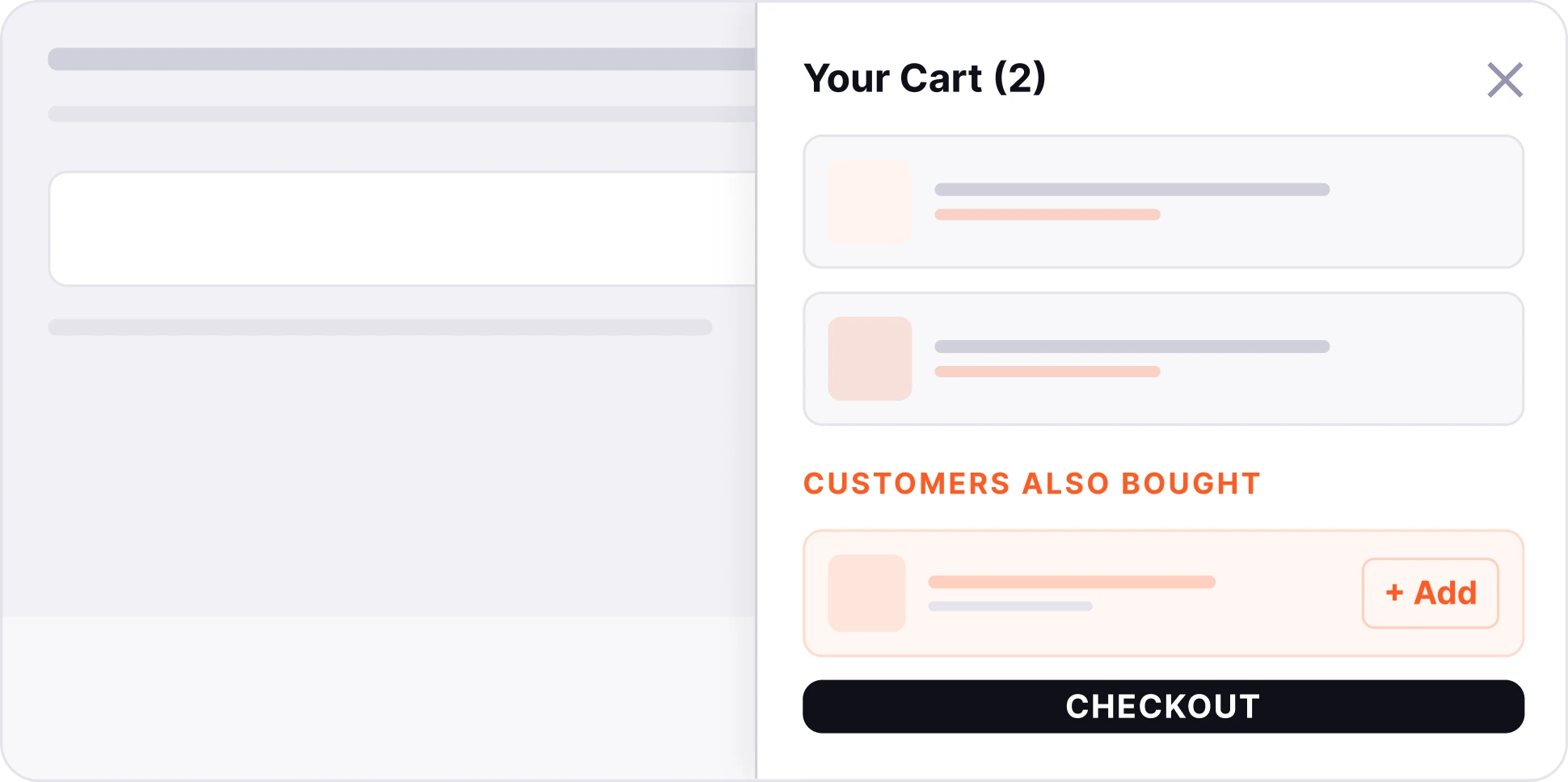
By default, clicking the cart takes customers away from the page. UpsellGrow replaces it with a slide-out drawer — customers review their cart, see offers, and go straight to checkout without leaving the page.
Cart panel slides in from the right — no page reload, no interruption
Cross-sell and bundle suggestions appear inside the cart at peak purchase intent
Customers edit quantities, remove items, and checkout — all in one smooth panel
5 locations. 19 positions.
Place offers where customers buy.
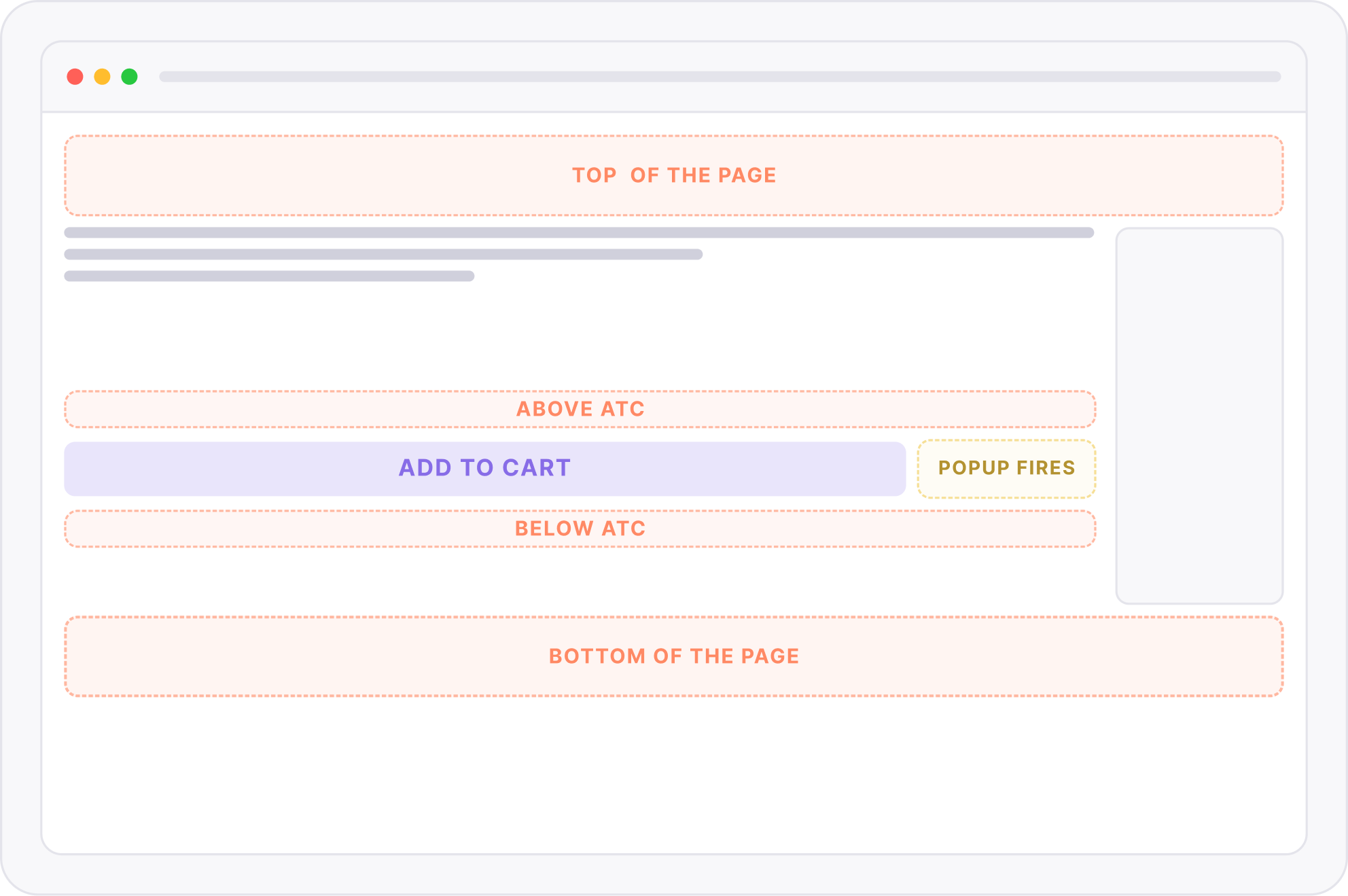
Unlike tools that put offers in one fixed spot, UpsellGrow lets you choose the exact position on each page — across all 5 key moments in the shopping journey.
Product page offers
The highest-intent page in your store. Customers are actively considering a product — the right offer feels like a helpful suggestion, not a sales push.
5 inline positions — you choose which
Popup trigger
You decide exactly
which products appear
together
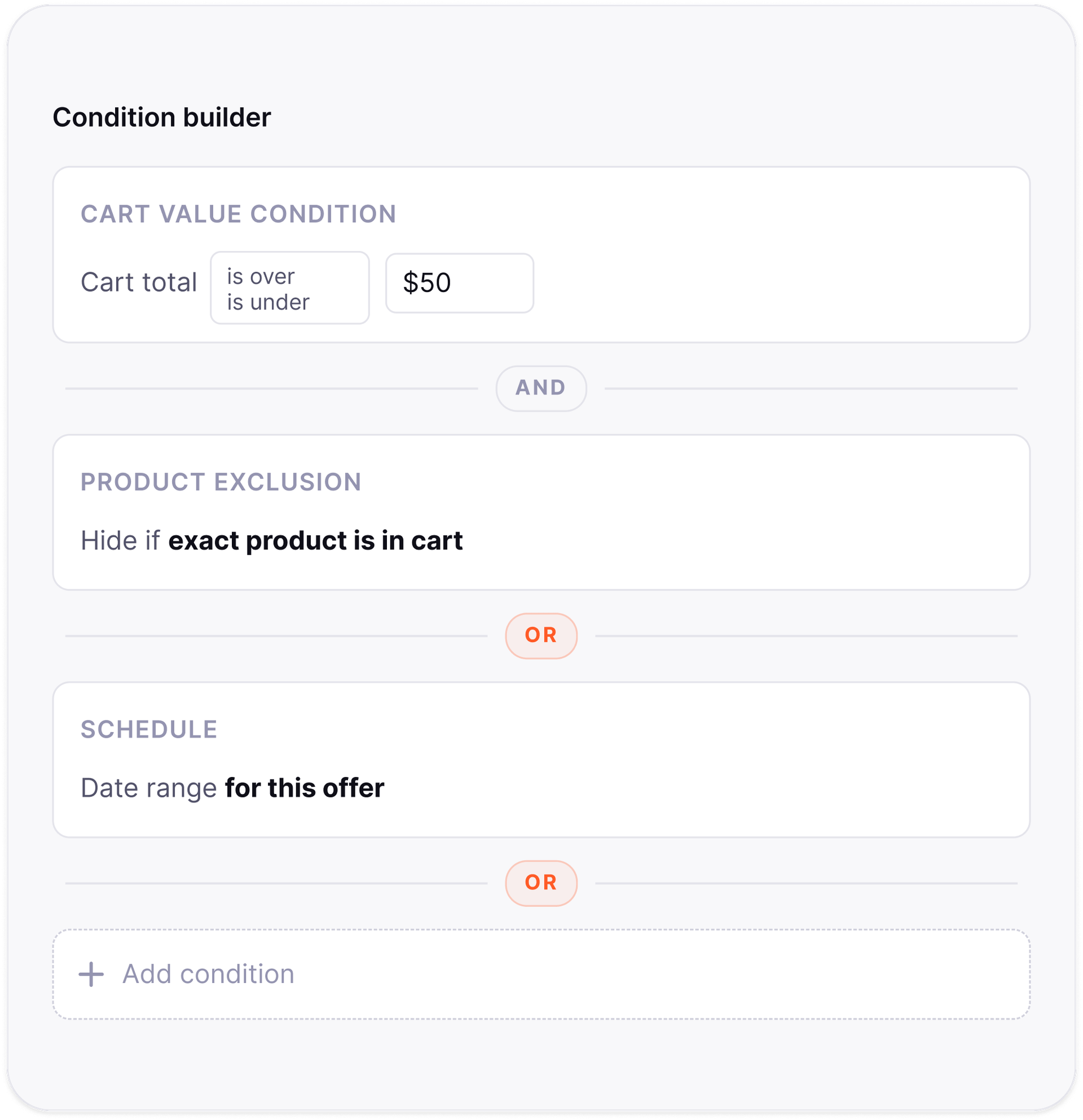
No algorithms, no AI guessing. You create conditions using a visual condition builder — and / or operators let you combine as many rules as you need.
Trigger by specific product — link any two products together
Trigger by collection — show offers across an entire category
Add AND / OR conditions — cart value, schedule, product exclusions
Offer analytics
See exactly what's working
— and what isn't
Every offer has its own analytics dashboard. Five metrics, one clean chart. Switch between offers, change the date range, toggle individual metrics on or off.
Impressions, conversions, revenue, AOV uplift — all per offer
7-day, 30-day, and 90-day views with trend vs previous period
Revenue by location — see which page performs best for your store
Every feature you need
to earn more from every visitor
Cross-sell offers
Suggest related products on any page. Customer adds them on top of their original purchase.
Bundle offers
Group products at a discount. Bundles are created as hidden Squarespace products via API — no manual product creation needed.
Frequently bought together
Analysed from your real order data. Shows the actual buying patterns of your customers — not guesses.
Slide-out cart drawer
Replaces the default Squarespace cart. Offers appear inside the drawer — customers never leave the page.
5 locations · 19 positions
Product page (6), cart page (5), slide-out cart (3), order confirmation (4), order status (4) — exact position control on every page.
Full analytics dashboard
5 KPI cards, revenue trend chart, revenue by location, top offers ranking, per-offer metrics with sortable table.
AND / OR condition builder
Build rules with multiple conditions joined by AND or OR. Drag to reorder. Cart value, schedule, product exclusions — all configurable.
Post-purchase offers
Show offers on order confirmation and order status pages — zero checkout friction, multiple touchpoints per order.
Popup offers
Fire an offer popup when customers click Add to Cart or Checkout — the two highest-intent moments in the shopping journey.
Priority rank & conflict resolution
When multiple offers compete for the same position, drag to set priority. The rank-1 offer always wins.
Up and running in minutes.
Not days.
Install UpsellGrow
Add the block to your Squarespace store and authorise access. Works on all Squarespace 7.1 stores on the Core plan or above. Takes about 5 minutes.
Create your first offer
Choose offer type (cross-sell, bundle, or FBT), pick your products, select the page and exact position. Design the look to match your store. Publish in one click.
Watch revenue grow
Your analytics fills with data immediately. See impressions, conversions, and revenue per offer — and optimise based on real data from your own store.
How Squarespace stores use
UpsellGrow to grow revenue
MODERN SUPPLY — FASHION
Our average order value increased within days of turning on cart upsells. Choosing the right-side position made the biggest difference — it felt natural, not intrusive.
Sarah Khan
Founder, Northline Studio
OAK & HEARTH — HOME
Bundle offers became our highest revenue channel within a month. The analytics showed us exactly which bundle was working — we killed two that weren't converting and doubled down on the one that was.
Daniel Brooks
Owner, Oak & Hearth
STUDIO LANE — RETAIL
Before UpsellGrow I had no idea which products people bought together. The FBT data showed me combinations I never would have thought to pair — and they convert brilliantly.
Nathan Cole
Growth Lead, Studio Lane
100+
Upsell offers created
across all stores
$20K+
Additional revenue
generated through offers
50+
Active Squarespace stores
using UpsellGrow
Start free. Upgrade when you're ready.
Every plan includes all 5 locations and all 19 position zones. You only pay more as you create more offers.
STARTER
Perfect for testing your first upsell offer
- 1 active offer
- All 5 page locations
- All 19 position zones
- All offer types (Cross-sell, Bundles, FBT)
- AND / OR condition builder
- Full analytics dashboard
GROWTH
For stores ready to seriously increase order value
- 10 active offer
- All 5 page locations
- All 19 position zones
- 1 offer type (Cross-sell)
- AND / OR condition builder
- Full analytics dashboard
SCALE
For high-volume Squarespace stores
- Unlimited active offers
- All 5 page locations
- All 19 position zones
- 1 offer type (Cross-sell)
- AND / OR condition builder
- Full analytics dashboard
All paid plans include a 14-day free trial. Cancel anytime.
Everything you need to know
before getting started

Start increasing average order value
on your Squarespace store today
Join 50+ Squarespace stores already using UpsellGrow to sell more from every order — without spending more on traffic.
Works on Squarespace 7.1 · Free plan available · No coding required · Cancel anytime